
How to Build a Writer’s Audit Trail From Day One
Set up a writer's audit trail in minutes to track sources, edits, and AI use without slowing down your content workflow.
A writer’s audit trail takes about four minutes to set up. After that, it mostly builds itself.
Content teams are moving fast right now, maybe too fast to notice what they aren’t tracking. CMI surveyed 1,015 B2B marketers for its 2026 report and found that 95% of their organizations use AI-powered marketing tools, with 89% using AI to generate or optimize written content. 87% said their own productivity got better this year. Only 39% said content performance actually followed. That's the gap this whole piece keeps circling back to. Most teams feel faster, and the honest ones will tell you they still can't point to real proof it's working, at least not the kind anyone outside marketing would sit still for. The full numbers are in CMI's 2026 B2B marketing report.
Speed without proof is exactly where audit trails earn their keep, because more output just means more unanswered questions later. Where did this claim come from, and can anyone besides you trace it back? Who changed the headline? Why, exactly, does a detector suddenly turn against paragraph six, of all places?
A clean audit trail answers those without turning you into your own surveillance department. Nobody is asking you to manufacture evidence here. You’re keeping the normal residue of doing the work carefully, things like the brief, the messy notes, a couple of real turning points, actual editorial feedback, plus eventually the file you shipped.
Spend four minutes at kickoff, not four hours after an accusation
The useful part of an audit trail starts before you write the first sentence.
When the assignment lands, create one project home. A Google Drive folder works fine. So does a Notion page with linked documents, an Obsidian vault, or a plain directory of Markdown files. Use whatever you already work in daily. Adopting six new systems in the name of provenance is how a five-minute habit turns into unpaid admin work nobody asked for.
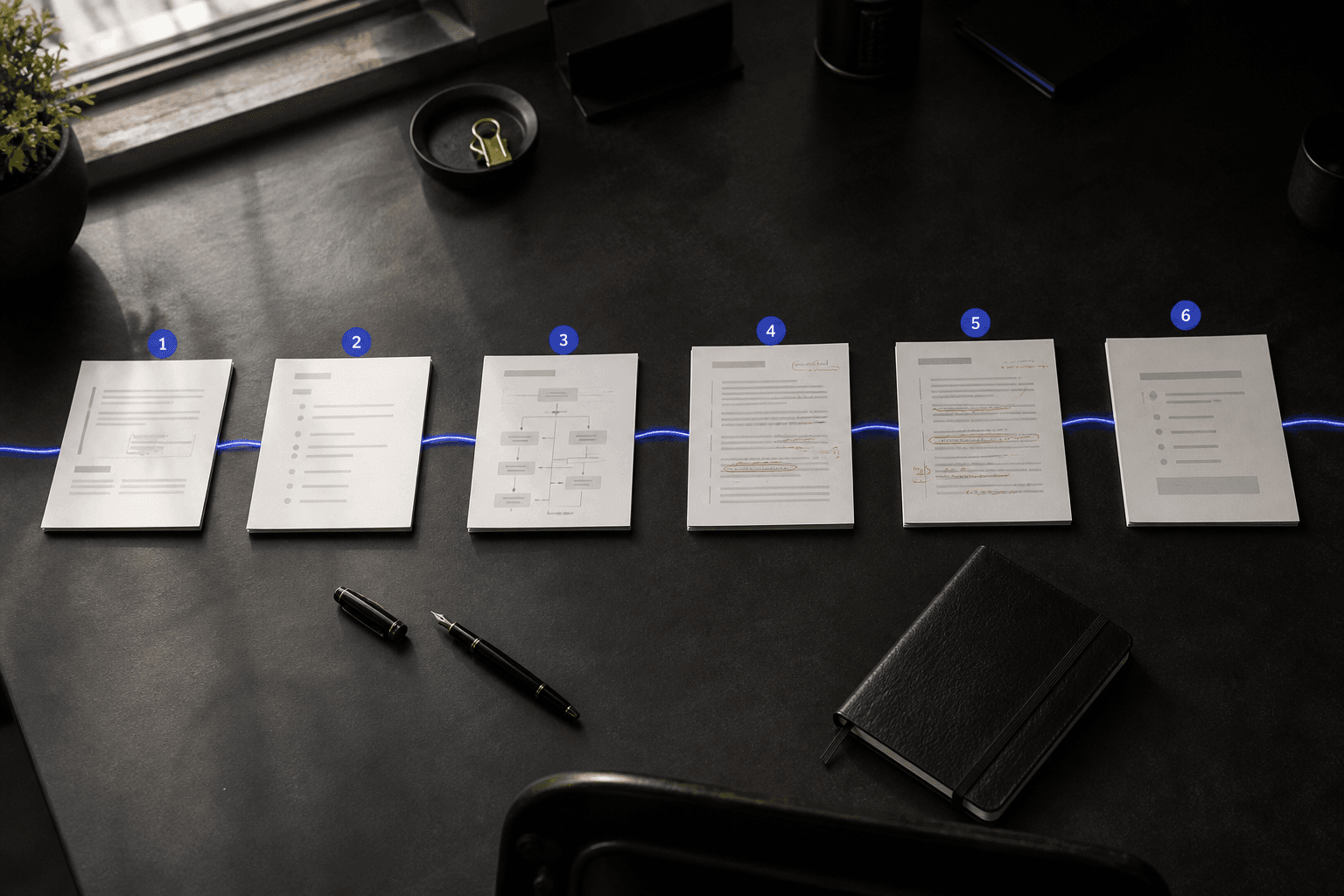
A typical client article keeps six files on hand, everything from the original brief and the research notes down to the outline, the working draft, review notes, plus whatever we actually exported for the client in the end.
Drop the original assignment into 01-brief.md. Include the date, the requested audience, the word count, sources the client supplied, and anything explicitly ruled out of scope. If the brief came through Slack, paste the relevant messages and link the thread instead of the whole channel. Nobody reviewing this later wants 400 messages about calendar scheduling.
Add one small section called Decisions. Ours for a recent project read:
- The client wanted a comparison page, not another product review
- Legal asked us to drop any claims about competitor pricing accuracy
- We killed the original “best tools” angle, since it never had a defensible selection criterion behind it
- The interview fell through, so out came the customer quote
That’s ninety seconds of typing. It also captures what a finished draft can’t show on its own, the judgment calls, the limits, the places you changed your mind partway through the work.
Students can do the same thing with an assignment prompt, a reading list, a thesis idea that shifted twice. Agency owners can use the client brief plus the contractor’s scope. An indie hacker writing a launch post might save a feature spec, a page of user-interview notes, and a screenshot of the bug that started the whole thing.
Context always has to come first, before any of this. Skip it, and version history just becomes a record of words showing up from nowhere.
A project folder beats a second productivity system
People overbuild this constantly, and it's almost always well-intentioned.
They buy a research database. Then a screen recorder. Then a new note-taking app, and every so often, a genuinely deranged color-coded taxonomy for comma usage. Two weeks in, the system has more structure than the writing it was ever meant to document, which is its own kind of red flag worth noticing.
Stick with tools that already leave real timestamps behind, because that's most of the work already done for you.
Google Docs and Word keep version history automatically. Notion tracks page history on the right plans. Git works beautifully if you’re already comfortable with Markdown, though asking a freelance writer to learn branching because a client wanted a blog post is a slightly deranged response to a fairly ordinary request.
What actually matters is that each artifact does one job.
| Artifact | What it proves | Keep it lightweight | | --- | --- | --- | | Brief | You understood the task before you touched a keyboard | Save the relevant email, prompt, or Slack thread | | Notes | Your angle and claims came from work someone can point to | Keep the important links and quotes, plus any objections worth remembering | | Outline | The structure existed before polished prose smoothed it over | Preserve the rough version, including whatever you discarded | | Draft | The document developed over time | Use normal version history | | Comments | Other people shaped the work | Leave editor feedback attached until the project closes | | Final export | The delivered file matches the approved work | Save a dated PDF or final CMS export |
Not every project needs every row here. A 500-word founder update might only need a brief and a rough outline, nothing fancier. A 3,000-word piece for a regulated industry needs more layers than that, mostly because more people will eventually come asking about it.
The rule that actually holds up is this. Keep the moments where the work got more specific.
A research note that says “find a stat about AI adoption” tells you almost nothing. One that says “use the April 2025 NORC survey, it separates daily workplace users from everyone else” tells you the writer made a real choice. The first reflects a task someone was handed. The second records a decision someone made on purpose.
That difference is authorship in practice.
Save the turn, not every keystroke
The worst audit trails I've seen are pure theater, and everyone involved usually knows it deep down.
Don’t create 300 meaningless revisions. Don’t screenshot a cursor moving around a document for no reason. And skip the trick of inserting typos on purpose and fixing them later because somebody told you burstiness makes a document read more human, that’s bad writing dressed up as evidence, and editors notice.
What actually convinces a reasonable editor, or an instructor who has seen a hundred of these, is a visible turn somewhere in the work. Maybe the headline changed once research contradicted your original premise. Maybe a client claim came out because the source turned out to be stale. Or an editor pushed for a stronger objection, and you rebuilt an entire section in response to that one note.
Each of those is a writer reacting to new information arriving mid-project, which is exactly the thing no detector on earth can see from a finished page alone.
The detector industry itself has made this more important, not less. A University of Chicago evaluation of four AI detectors found that outcomes depended heavily on which tradeoff, between false positives and false negatives, a policy setter was willing to accept. Its 2025 research on artificial writing and automated detection treats detection as a policy choice rather than a magic authorship test, which is closer to how we think about our own product too.
Keep checkpoints along the way instead of constant noise, nothing more elaborate than that. Right after research, save the source list and jot down which single claim actually changed your angle on the piece. After outlining, save the structure before prose smooths over the rough edges. Once the first complete draft exists, let version history capture the imperfect whole rather than some cleaned-up copy of it. Keep the comments after any meaningful review, along with your actual response to them, and export the final version at delivery, noting exactly where you sent it.
Most assignments only need about five of these, not a second full-time job on top of the writing.
If a detector eventually hands back a high score, sentence-level flagging can point you toward which passages deserve a second look. It can’t tell you why you cut a weak statistic, or why a conclusion changed after an editor’s note. Your audit trail already has both answers.
If AI touched a sentence, record the decision beside it
Disclosure gets easier the more boring you make it.
If a client allows AI assistance at all, keep a short ai-notes.md file sitting in the project folder somewhere. Log material use, not every spell-check suggestion. “Asked Claude for five headline alternatives, chose none of them” is worth a line. So is “used an AI writing assistant to shorten two sentences in section three, then rewrote both by hand.”
A practical log usually holds four things:
- Tool and date
- Purpose: brainstorming, copyediting, or getting sources organized
- Whether you accepted, rejected, or substantially rewrote what it gave you
- Any client, school, or publication policy that applied to the project
This protects the writer as much as the reviewer. A 2026 study of 176 participants found that AI-assisted writing lowered people’s sense of ownership over their own work by roughly 0.85 to 1.0 points on a seven-point scale, even while their reported cognitive load dropped. The researchers recommend logging that decision the moment it happens, not reconstructing it afterward. “Who Owns the Text?”
They called that idea point-of-decision provenance. It's a useful phrase mainly because it doesn't pretend the process was tool-free to begin with.
You can use AI and still be the author. You can also use it in a way that genuinely changes who the author is. The record should make that difference visible instead of quietly papering over it.
“Used AI to generate a first draft of the full article, then edited it” describes a materially different workflow than “used AI to suggest alternate subheads after finishing my own draft.” Hiding that gap is what eventually creates a credibility problem you can't easily talk your way out of. Naming it turns the exact same gap into an ordinary editorial conversation instead.
Delivery day is when the audit trail becomes useful
A project folder only helps if you can hand it to somebody else without opening what amounts to a small museum of your own desktop.
At delivery, write a compact closeout note. Four lines is usually enough to cover it:
- Final deliverable:
client-comparison-page-final.pdf - Major revision: removed two unsupported pricing claims after fact-checking
- Editorial input: added an objections section after editor comments on August 12
- AI disclosure: Grammarly, plus an approved assistant for headline options and nothing beyond that
After that, archive the folder and get back to your week. Don’t send it proactively with every invoice, most clients want the article, not a courtroom exhibit. Just keep it ready for whenever originality turns into a live question, because on some project, eventually, it will.
Workplace AI use is still wildly uneven, which is exactly why that day comes for some writers and not others. According to NORC's AmeriSpeak AI Adoption Report, a nationally representative survey from April 2025, 15% of employed Americans use AI at work daily, while 58% said they never touch it at work at all, a real number attached to something writers already sense day to day.
Two people on the same project can hold completely different assumptions about what normal even looks like. One treats AI-assisted outlining as routine, barely worth mentioning. The other sees a single clean paragraph and reaches straight for a detector.
Winning that argument philosophically isn’t your job. Showing how the work actually developed, calmly and without drama, is.
Start the next assignment with one folder, one saved brief, plus a decision log you actually keep updated instead of abandoning by week two. Then use Did AI Write It to check sentence-level flagging, hold onto version history as you revise, and build an audit trail that shows the work instead of just insisting it’s yours.